![Veridiction Consulting, Independent Educational Consultant [Logo]](https://veridiction.com/wp-content/uploads/2025/07/cropped-cropped-Image-1.png)
Today we’re going to learn an advanced technique (that is: optional!) for demonstrating interest in (pandering to) a university we want to be admitted to without leaving home, reversing that technique to find more universities to be interested in, and recording this work to make our essay writing more efficient for the next several years.
Part 1: The Practice of Pandering
Step 1: Get your university, either one you already are keen on or from the “best universities for [my preferred major]” list Google will spit out.
Step 2: On the university’s website, do one of the following (or a combination of the following):
- Find where they’re bragging about their research or “faculty excellence” chops (probably under “academics”)
- Find their press releases or “newsroom” section (it might be a “blog”); these are often linked in the footer of page, see example screenshot below.
- Find the specific sub-school/department website that you care about and dig into their faculty directory or specific newsroom from there (as I did).

Special: Some universities or departments may also be cross-posting press releases to LinkedIn, so don’t ignore those external links.
For example: here is an article from Dr. Stelmaszak Rosa in the news feed from the Isenberg School of Management at the University of Massachusetts Amherst (note the “/news/” in the address). The content of this blurb gives us a good feel for whether or not we should care about this specific research — we’ll say, for the sake of the example, that we do because algorithms falling back to human mediation entertains me — and it very conveniently links to it (currently open-access).
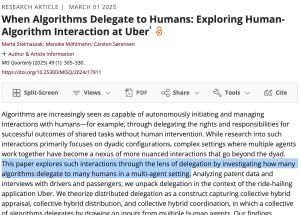
The trick with academic papers is that you’re not expected to just sit down and read them straight through, especially not when you’re not even in college yet. Here is the reading process Brown University recommends, and here is what the NIH recommends. What I recommend is read the abstract, read the intro until it drags, skip to the conclusion and discussion section at the end, and only then decide if the methodology in the middle is worth your time to rigorously review. Bless you if you’re interested enough to do that work, but mostly we just wanted to vibe-check the research to see if it was interesting to you. And we do this so that when you schedule a visitation to the campus you can ask:
“Would it be possible to meet Dr. So-and-So? My curiosity was piqued by their paper on This-and-That and I’d love to know where they’re taking that research next!”
And when you’re writing a supplemental essay — especially the university’s “Why Us?” essay — this turns into:
“The work that Dr. So-and-So is doing on This-and-That seems like it will have profound implications for my interest in The-Other-Thing so my best opportunity to pursue my current passion is studying under them with the relevant support and resources of your institution.”
This boosts your rating for this university in 3 ways:
- First, it helps indicate that you can keep up with the academic rigor of the university because you’re actively engaging with the material that a professor is producing.
- Second, it shows that you will take initiative to feed your intellectual curiosity, both of which are qualities that admissions is looking for more of in their academic students.
- Finally, and this is of proportional importance with the selectivity of the admissions process, it shows that you’ve done the work to cultivate care about their school and their staff already which makes it look like (A) you’re more likely to accept an offer of admission from them and (B) will then be a nerdy little delight to all of the increasingly disillusioned and burnt-out professors who really need to see their teaching doing some sort of good in the world — both of which indicate that you’re going to make the job of administrating the university easier for the admissions folks reviewing your file.
I realize that is not what you said, but that is what they read.
But wait, there’s more!
Part 2: Find the Next Competitive University
There is, at least for hopefully a little while longer, an alternative Google which is Google Scholar. And you can search for people (like, as she was credited on the paper) Marta Stelmaszak to perhaps find all of their other published papers specifically attached to their identity (reliant on them maintaining a Google Scholar account). Even so, other scholars like my local favorite Dr. Whitney Phillips can be searched for to have their publications listed, often without the typical paywalls. So this is the method to use if you want to find more material from a specific scholar.
But let’s not get over-focused on a single person here! Let’s instead use the easiest research trick I picked up in grad school (inadvertently from the also delightful Dr. Wendy Chun who chastised people for citing papers without reading them) and it is to dig through the bibliography of the paper you’ve got and trace its sources. Looking back at our example “When Algorithms Delegate to Humans” paper, you can see that it is thick with source citations even from the first sentence of the introduction. In this web-friendly rendering they show up as clickable links that then also link to their sources (yay!) but more traditionally the bibliography at the end could run for 30% or so of the paper’s total length to cite prior work.
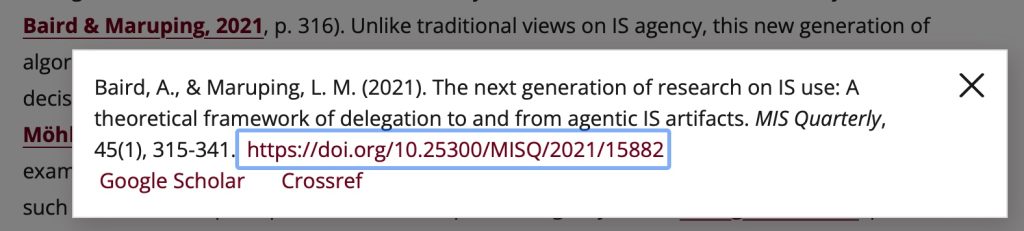
So here’s what we do: grab a reference that looks interesting to you, open it up, give it a cursory read using the methodology previously described and then — if you like it — track that author back to their university. So, using the Baird & Maruping 2021 citation (screenshot above), we crack open that paper with the link provided and (presuming we also like this paper for the sake of our example) we can track Baird down. The article indicates that he was at Georgia State University but that was when it was published! So we’re going to go Google “Aaron Baird phd,” see that he’s in Google Scholar, and is at Colorado State now as, to be fair, the first result Google offered up clearly suggested.
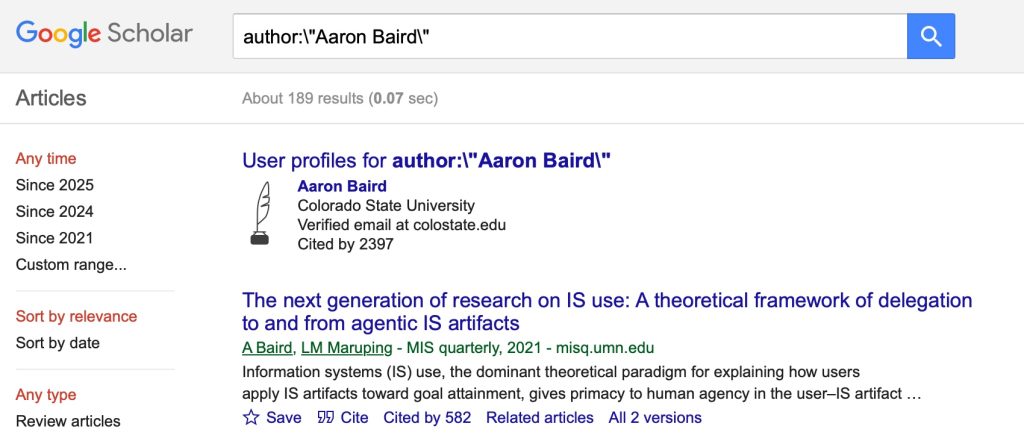
So what did we just get you? We got you 2 scholars to follow on LinkedIn, 1 more very relevant college to consider for your college list, and 2 articles you can cite as sources or reference in a literature review or annotated bibliography before you even go scraping the bottom of the research barrel along with the extensible methodology to scale that up as far as you want to go.
For more nerding out on Google Scholar, consider cross-referencing influencer trends as suggested by this influencer on Instagram.
But let’s talk more about how to retain this knowledge and extract ongoing value from the articles you’re consuming.
Part 3: Enter Zotero.
Allow me to introduce my dear friend, Zotero: https://www.zotero.org
Zotero is the tool they didn’t quite get around to teaching us in grad school that we should’ve had much earlier because it’s how you can build out a core block of citable resources and you — even/especially as high schoolers — are going to love it because it allows you to generate citations in like 14 different formats inclusive of APA, MLA, and Chicago. Let me restate that: this will solve almost all of your bibliography-formatting problems from now through grad school.
It works like this:
- Install it.
- Register your account.
- Now you can import PDFs (drag & drop) or “Add item by identifier” like DOI (as seen at the top of those papers and journal articles) or ISBN (as seen on books that Amazon or Powells has for sale). Urls probably work too for news articles (but I regard those as too volatile for my purposes).
- And arrange these important citation materials into relevantly-named folders so that they don’t become an incoherent mess for you over time.
- And “Add Item Note” where you can either copy direct quotes of blazing relevance from the source material, or fill in your abstraction/paraphrase, or simply put in your flavor-commentary.
- And finally (for our purposes): right click on the title to “Create Bibliography from Item” to generate the citation in the format you need directly on your computer’s clipboard ready to be pasted into your paper (or class discussion board).
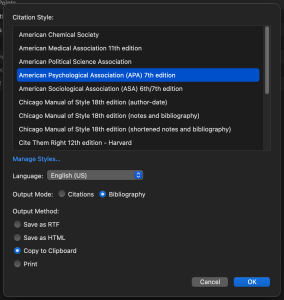
If you want to see this in action, here’s a video tutorial that I’m confident in recommending.
And now you’ve started building up a ready repository of materials that you can parlor-trick into your essays et cetera when certain topics keep on coming up. (Really, in grad school I was citing “Arendt, H. (with Applebaum, A.). (2024). The origins of totalitarianism (First Mariner Classics edition). Mariner Classics.” or “Foucault, M. (2020). Discipline and punish: The birth of the prison (A. Sheridan, Trans.). Penguin Classics.” every single week — having Zotero would’ve saved me 100 hours easily.)
Tiny Zotero FAQ:
I’m reading a physical book, how does Zotero help me? Use the ISBN of the book to get the book’s reference metadata in Zotero. When you find something in the book you like, use your camera phone to take a picture of the page, then use your photo service (Apple or Google I expect) to automatically OCR [Optical Character Recognition] the words on the page you photographed so you can copy and paste them into a Zotero item note. Don’t forget to include the page number(s)!
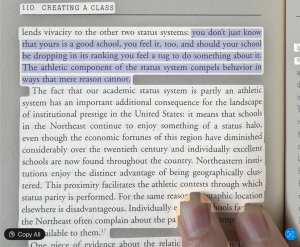
How can I seem more nerdy without actually reading books? Your library has a lot of great books available as both audiobooks and ebooks. Check the audiobook and ebook out at the same time. Listen to the audiobook and when something particularly salient comes up, pause your listening and jump to that part of the ebook to copy the relevant text from the ebook into Zotero (or at least study it down to an abstracted level for methodological purposes). For the most of you who are in Washington County (Oregon), here’s my local library’s Libby app page to get looped in to those materials.
Closing Thoughts
So that’s how you can dig through research that universities are producing to find out if you like where they’re going, or dig through research to find the universities with faculty that are producing the sorts of things that are interesting to you.
It is entirely possible that you will find papers that are stupefyingly boring to you. This is also valuable feedback! It’s a clear warning that one or more of the researcher, the university, or the subject matter would not be conducive to your growth and would be an ineffective way to invest your educational time and money. It’s not a sign to stop this process, it’s a sign to restart it with something else or somewhere else until we discover a valid combination — the sort of researcher, the kind of university, the relevant subject matter — that does pique your curiosity and demonstrates your interest in their work of tomorrow.